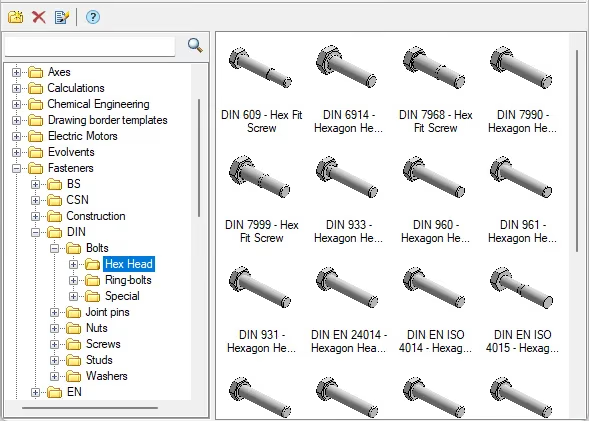
Fasteners appear throughout industry. Mechanical assemblies commonly use bolts, screws, and studs to join parts. Rivets are particularly common in shipbuilding and aircraft construction.
In nanoCAD Mechanica, you can place fasteners through a stack of parts, then edit or replace them as the design changes. The software handles much of the repetitive drafting.
Bolted joints can be drawn in detail or in simplified form. Assembly and general arrangement drawings often show fasteners unsectioned, even within a section view. Choose the appropriate insertion option to obtain that representation. Mechanica can generate front, side, top, and bottom views where the joint geometry allows and adjusts the visibility of its components accordingly.
The bolted joint tool works with bolts, screws, and studs. Select a stack of parts, which may have different thicknesses. The chosen fastener must suit their combined thickness. If the stack is too thin or too thick, the software cannot form that joint.
Mechanica identifies the parts in the stack and locates the holes. It can create plain holes, tapped through holes, blind tapped holes, or general-purpose holes, and add standard seats for bolt and screw heads.
Fasteners are linked parametrically to the rest of the joint. For example, the nut takes its thread diameter from the bolt it fits.
Mechanica sets the drawing order for each view. In front and side views, the nut hides the portion of the bolt shank behind it. Viewed from below, the bolt end appears in front of the nut. Each view reads correctly without manual cleanup.
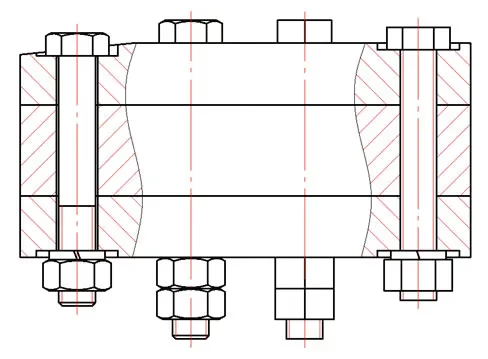
The illustration shows detailed and simplified views of hex bolts and nuts. Once you choose a bolt diameter, Mechanica uses the stack thickness and nut position to filter the standard lengths and offers only those that fit.
For countersunk screws, place a matching seat from the parts library in the stack. A standard countersunk screw head then locates itself in that seat.
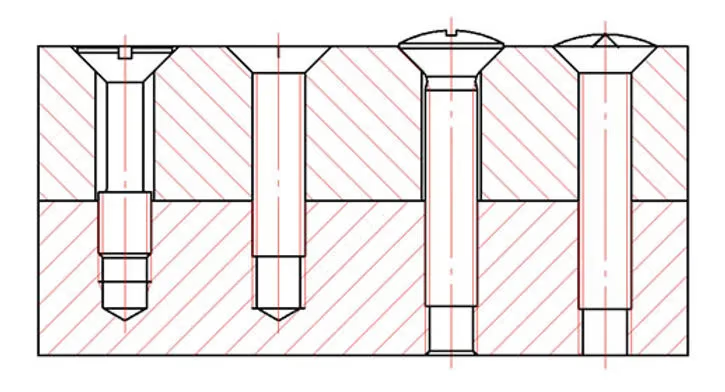
For a blind tapped hole, Mechanica helps you specify the thread runout and incomplete thread at the bottom of the hole. Once you select the screw length and diameter, it derives the remaining dimensions from the thread pitch.
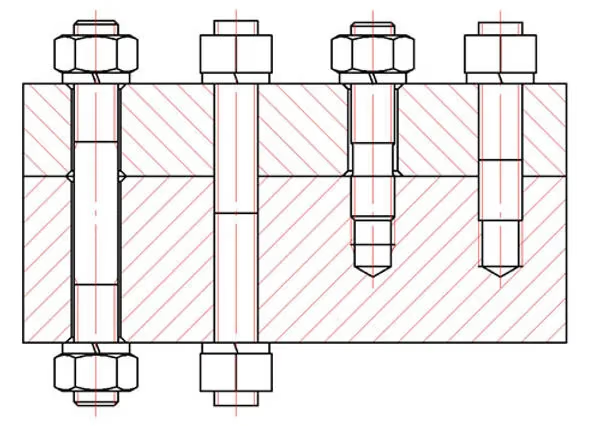
Stud behavior depends on its standard. A tie stud sits at the center of the stack and changes length equally at both ends. A screw-in stud engages a tapped hole at one end.
A critical bolted joint can use a locknut, spring washer, cotter pin, or special locking washer. Mechanica mates these parts to the corresponding elements of the joint.
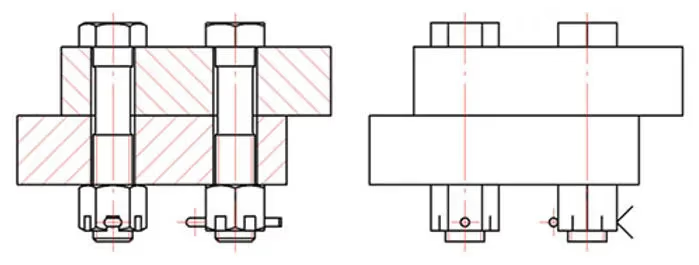
Drafting pinned fasteners raises a question when the applicable standards use different conventions. Individual fastener drawings often show the pin hole parallel to a flat on the bolt head. How should that hole appear when the assembly also includes a slotted or castellated nut?
The author cites GOST R ISO 7378-93, which shows the pin hole perpendicular to a flat on the bolt head. Mechanica follows that convention in the assembly view so the hole and the slots in the nut can be shown together.
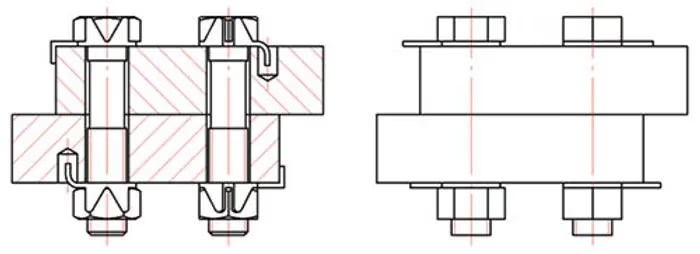
Standards do not cover every possible combination of fasteners. Mechanica therefore leaves the final arrangement of a bolted joint to the designer.
Mechanica also has a riveted joint tool. It works much like the bolted joint tool and lets you create and edit different drawing views of a riveted connection.
The parts library includes standard- and high-precision rivets with several standard head shapes. Rivets can join parts of different thicknesses. Mechanica filters out diameters unsuitable for the total grip thickness.
For standard-precision rivets, the standard referenced here specifies neither the formed head shape nor a definitive shank length. The designer can set both, including the geometry of the formed head. A drawing can show a rivet before it is set, change the joint clearance, or show a sectioned or unsectioned view.
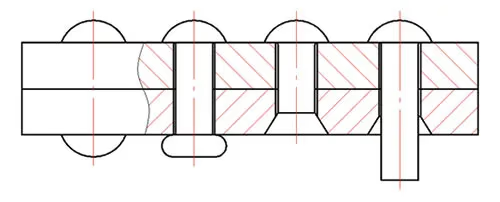
The library also includes tubular and semi-tubular rivets, which can be shown in section.
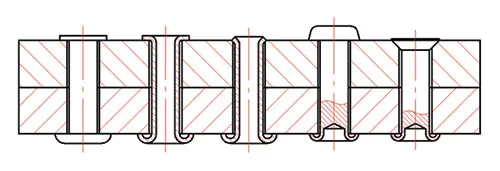
When several parts of a joint need item numbers, Mechanica stacks the numbers on a common leader. Standard fasteners are placed in the appropriate section of the bill of materials and named according to their respective standards.
You can also build custom fasteners from existing library parts and retain their behavior.
If a supplier or shop stocks only certain fasteners, use the library filter to restrict the available selection. You can hide an entire standard or individual sizes so designers use only approved parts.
Mechanica reduces the time spent detailing bolted and riveted joints by combining standards-based library parts with rules for how the fasteners fit and appear in each drawing view.